When we are on a car ride we can’t satisfy everyone in there, and it is really hard to listen to the music that we don’t want to listen to. But in iOS 17, there is a new feature that allows anyone in the car to control the music using their own devices. The SharePlay feature will help you to do that. The CarPlay will help you with a great car ride. This is more beneficial for people who have wired CarPlay. This helps you to add any mate’s favorite song with the SharePlay. In this article, we are going to show you how to do this. But remember that you have to update devices to the latest iOS update. Simply go to the settings and do it.

How to Start a SharePlay
Apple device users already do this SharePlay on their Facetime or iMessage. But this is a little bit different from it.
- First, within the CarPlay, go to the Music app.
- Then navigate to the Now Playing section.
- There is a SharePlay icon in the upper right corner. Tap on it.
- The passengers in your car can connect to it using their iPhone’s Music app or through the QR code.
- Then, a notification will appear on the car’s screen. You have to tap.
- Then you can see a list and there the people requesting to join will appear here. You can approve them as you wish.
If you don’t want others to join your CarPlay you can turn off the SharePlay session to automatically display to others. When this happens, if anyone in your opens the Music app, they can’t see the join option. Approving anyone means you give all the access to them to control the music. They can pause, play, skip, or rewind a song again and again. Also, they can add any song as they wish and view the list or shuffle it. The best thing is that even if someone doesn’t subscribe to Apple Music, they can still use this feature.
How to Join This From a Device
When we are in a car ride, we use the navigational directions, and with that giving the QR code to others is impossible. But, the passengers who already have access can add other people to this.
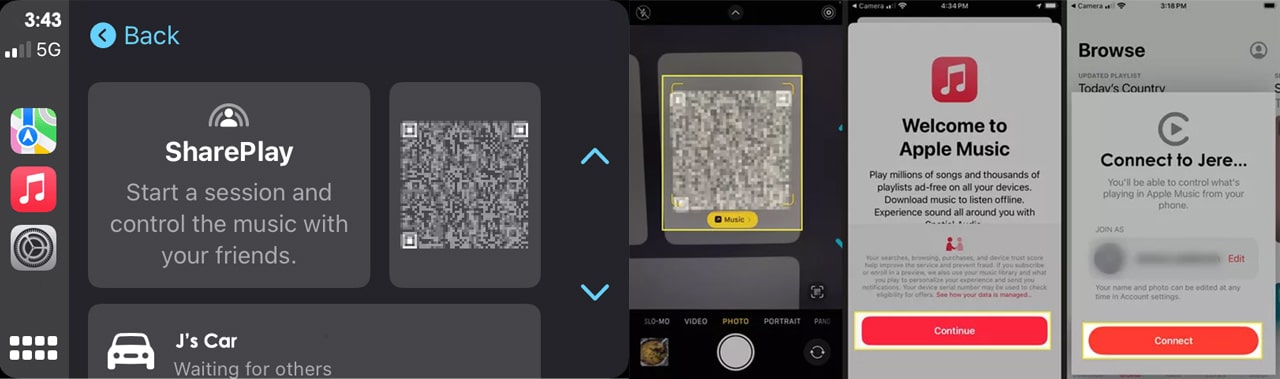
- If the device already has access, open the Music app on it.
- Then you can see Now Playing, open the screen.
- There is a CarPlay icon on the bottom. Tap on it.
- Then, you can see if someone wants the QR code to scan.
- You can approve them or deny in here.
With this feature, anyone in the car has the same access to join the session. No matter what is their seat position. You can use Siri for song play requests, but there will be some issues like it will pay the wrong one instead of the desired one. This is available for iPadOS 17 too. If you have a car that supports CarPlay and a capable Apple device with the latest operating system, now you can enjoy your ride while others will look after the Music. The one who joins this can see the list of other joiners and if they want, they can leave also.