When it comes to listening to songs, for Apple users, one of the best choices is Apple Music. It allows users to listen to over 100 million songs on their devices. They launched this eight years ago on June 30, 2015. When you sign in to this service new subscribers can get a one-month or six-month free trial. In 2022, in October Apple increased the price of their plans. The individual plan now costs $10.99 per month, and the family plan is $16.99 per month. Also, there is an annual plan for individuals that costs $109 per whole year. This Apple music is not only for Apple users. But also for Android users. They introduced this for Android devices in 2015 and launched their web player on 2019 September 5.
In this article, we are going to talk about how to stop automatically adding Favourite songs to your library in Apple Music.
In 2023 October Apple released its iOS 17.1. with this update, they introduced a new feature called ‘Favourite’ for Apple Music. With the update 17.2, they updated this version with new features. With this when users’ favorite song is automatically added to your library. Many users are like this. But for some people, this is kind of annoying and they want to stop this. It leads to a debate. Fortunately, apple allows users to turn off this feature as they wish.
With this new update, Apple Music will automatically add your favourite songs to the library and this comes as a default setting. But they add a toggle to this in settings. To do this,
- Open the Settings apps on your device.
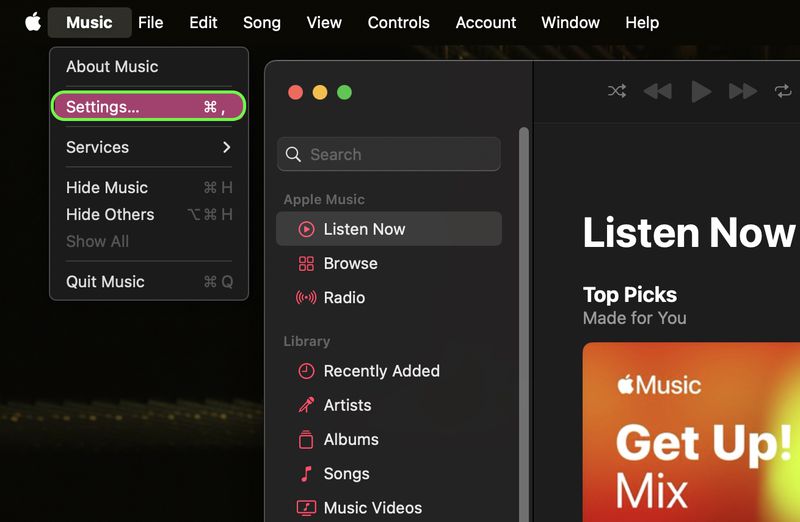
- Then scroll down in the menu and tap ‘Music’.
- Locate the ‘Add favorite songs’ toggle.
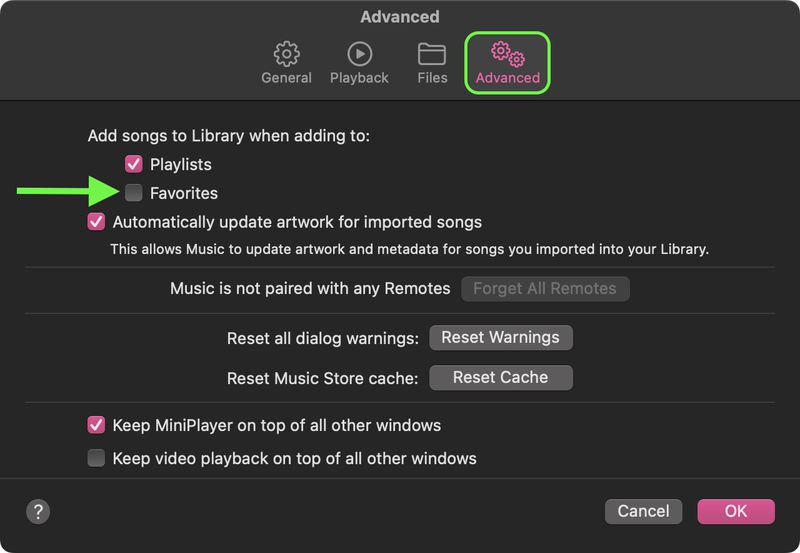
- Switch off the toggle.
When you off this toggle, you can mark songs as favorites without adding those songs to your library. But they still add to the Favourite playlist in the new updated 17.2.
Most people don’t like this feature, and they find it annoying when songs are added to their library without their approval. With this tip, you can easily turn off that and enjoy your favorite songs.